
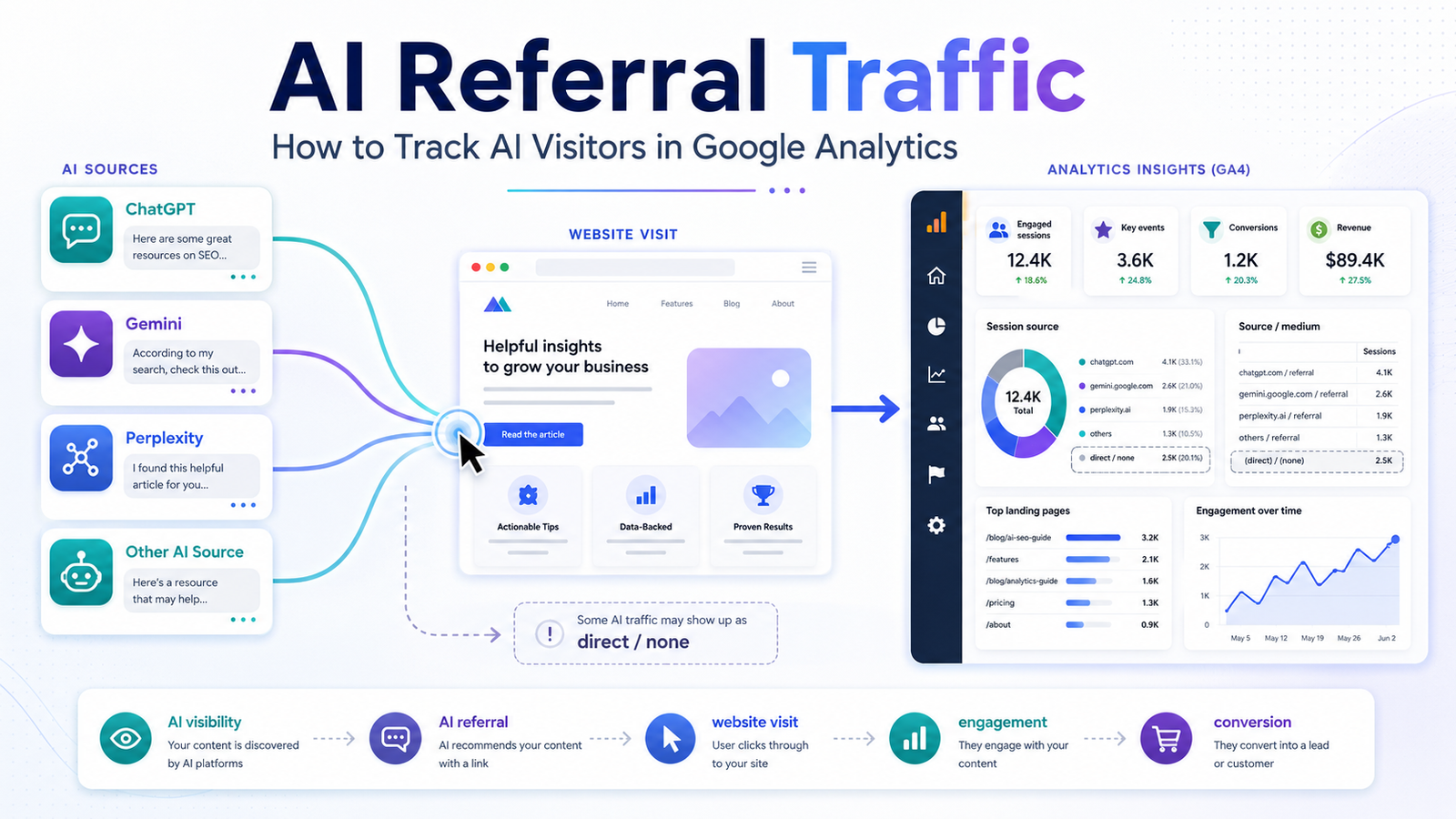
AI search is changing how people discover websites. Instead of searching Google, comparing ten blue links, and choosing a result, users can now ask platforms such as ChatGPT, Gemini, Perplexity, and other AI-powered systems to research a topic, compare options, or recommend a solution.
But there is an important question for marketers:
Are those AI experiences actually sending visitors to your website?
This is where AI referral traffic becomes important.
AI referral traffic refers to website visits that originate from AI platforms or AI-powered experiences when a user follows a link to your website. Tracking this traffic can help you understand whether your AEO, GEO, content, and brand-visibility efforts are producing measurable website visits.
Google Analytics 4 (GA4) already provides traffic-source dimensions that can help identify where sessions originate.
Let’s look at how to find and analyze this traffic.
What Is AI Referral Traffic?
AI referral traffic is traffic that reaches your website after a user discovers your content, brand, product, or service through an AI platform and clicks through to your website.
For example:
User asks ChatGPT a question
↓
ChatGPT provides an answer
↓
Your website is referenced
↓
User clicks your website
↓
GA4 records the session
That session may provide a traffic source that helps you determine where the visitor came from.
The same concept can apply to other AI platforms and AI-powered discovery experiences.
However, it is important to understand that not every AI-influenced visit will necessarily appear as an identifiable AI referral. If referral information is unavailable, GA4 may classify the visit as.
Why Should You Track AI Referral Traffic?
AI visibility is interesting, but visibility alone doesn’t tell you whether people are actually visiting your website.
Imagine that your brand starts appearing in AI-generated answers.
That’s useful.
But what happens next?
You want to know:
- How many visitors arrived?
- Which AI platforms sent them?
- Which pages did they visit?
- Did they engage with the content?
- Did they submit a form?
- Did they make a purchase?
- Which AI sources produce the most valuable visitors?
This turns AI search from an abstract visibility metric into something you can connect with website performance.
The measurement journey becomes:
AI visibility → AI referral → website visit → engagement → key event → conversion
That is much more useful than simply counting how many times your brand appears in an AI answer.
How to Find AI Referral Traffic in Google Analytics 4
Step 1: Open Google Analytics
Log in to your Google Analytics account and select the GA4 property associated with your website.
From the left-hand navigation, go to:
Reports → Acquisition → Traffic acquisition
Google describes the Traffic acquisition report as the report designed to help you understand where visitors are coming from.
Step 2: Look at Session Source
The default Traffic acquisition report provides different traffic-source dimensions.
One of the most useful for AI referral traffic is:
Session source
Google defines Session source as a representation of the publisher or source from which the traffic originated. Examples include sources such as Google and YouTube.
You can also use:
Session source/medium
This combines the source and medium into one dimension.
For example, you might see values representing a website referral or another acquisition method.
Step 3: Search for AI Platforms
Use the search/filter functionality above the report table and investigate recognizable AI sources.
Depending on the platforms sending traffic to your website, you might look for sources associated with services such as:
- ChatGPT
- Perplexity
- Gemini
- Claude
- Other AI platforms
The exact source value you see depends on how the referral is passed to Analytics.
This is important because you shouldn’t assume that every AI platform will appear under one universal “AI” source.
Google’s traffic-source system identifies the source and medium based on available traffic information.
Step 4: Analyze Session Source / Medium
Switching to Session source/medium can make your analysis easier because you can see both where the session originated and the type of traffic.
Google defines medium as the method through which users arrive, with examples such as organic, cpc, email, and referral.
For AI referral analysis, you are primarily looking for recognizable AI sources and referral-type traffic.
Don’t worry if your exact report doesn’t look identical to another website’s GA4 report. Traffic-source values depend on the information available when the visit reaches your property.
Step 5: Check Which Pages AI Visitors Land On
Knowing that AI traffic exists is only the beginning.
The next question is:
Which pages are receiving it?
This is where the analysis becomes much more valuable.
For example, imagine you discover:
ChatGPT → /shopify-experts/
while:
Perplexity → /best-shopify-themes/
That tells you that different AI discovery journeys may be sending users to different parts of your website.
You can then investigate whether those landing pages actually satisfy the intent behind the visitor’s journey.
This creates an important connection between GEO and CRO.
Your goal isn’t simply to receive an AI referral.
Your goal is to make that visit useful.
Step 6: Measure Engagement and Conversions
Don’t stop at sessions.
A website receiving 1,000 AI visitors isn’t necessarily performing better than a website receiving 100.
You need to understand what those visitors do.
Useful metrics can include:
- Engaged sessions
- Engagement rate
- Events
- Key events
- Revenue
- Session key event rate
- Landing pages
GA4’s traffic-source reporting can be analyzed alongside engagement and key-event metrics, allowing you to compare how different traffic sources behave.
For an ecommerce website, you might ask:
Did AI visitors purchase?
For a service website:
Did AI visitors submit an inquiry?
For a SaaS website:
Did AI visitors sign up for a trial?
This is where AI referral traffic becomes a business metric rather than simply an SEO statistic.
Why Some AI Traffic May Appear as Direct Traffic
This is one of the most important things to understand.
You may check GA4 and think:
“We’re getting almost no AI traffic.”
But that doesn’t necessarily prove that AI isn’t influencing your website discovery.
Google explains that it represents traffic for which Analytics doesn’t have a clear referral source. Missing traffic information, redirects, certain tracking limitations, offline links, and other situations can contribute to direct classification.
Therefore:
Identifiable AI referral traffic ≠ total AI-influenced traffic.
This distinction is extremely important.
A user could discover your brand through an AI system, remember your company name, and later type the URL directly into their browser.
GA4 may then record that later visit as direct.
So don’t interpret direct traffic as proof that AI had no influence.
Can You Track Every AI Visitor Perfectly?
No.
This is one of the most important expectations to set.
Analytics depends on the traffic-source information available when the user arrives.
If the referring information is preserved, GA4 has a better opportunity to classify the source.
If that information is missing, the session may be classified differently.
Google recommends ensuring that campaign and traffic-source information is properly maintained because missing source information can reduce attribution accuracy.
This means your AI referral report should be treated as measurable AI-attributed traffic, not a perfect measurement of every AI-influenced visitor.
Create an AI Referral Traffic Dashboard
Once you have enough data, you can create a simple reporting framework around AI traffic.
Track:
| Metric | What it tells you |
| AI sessions | How many identifiable sessions came from AI sources |
| AI users | How many users arrived through those sources |
| Engagement rate | Whether visitors interact with your content |
| Landing pages | Which pages attract AI visitors |
| Key events | Whether visitors take valuable actions |
| Revenue | Whether AI traffic contributes to sales |
| Source | Which AI platforms send traffic |
| Source/medium | How the traffic is classified |
Over time, this allows you to compare AI sources instead of treating all AI traffic as one category.
How AI Referral Traffic Connects With GEO
This is where AI referral tracking becomes particularly useful for SEO and marketing teams.
GEO asks:
“Is our brand visible in generative AI?”
AI referral tracking asks:
“Is that visibility sending people to our website?”
CRO asks:
“What happens after they arrive?”
These are three different questions.
A brand might have excellent AI visibility but very little referral traffic.
Another brand might receive fewer AI mentions but attract highly qualified visitors from those mentions.
Therefore, don’t judge AI-search performance from visibility alone.
Connect the entire journey:
Visibility → Referral → Landing Page → Engagement → Conversion
Practical Example
Imagine an ecommerce brand starts optimizing its content for AI search.
After several months, GA4 shows:
ChatGPT → 180 sessions
Perplexity → 75 sessions
Other AI sources → 40 sessions
At first, ChatGPT appears to be the winner.
But then you look deeper:
ChatGPT
- 180 sessions
- 35% engagement rate
- 4 conversions
Perplexity
- 75 sessions
- 62% engagement rate
- 8 conversions
Suddenly, the picture changes.
Perplexity generated fewer visitors but more conversions.
This is why traffic volume alone isn’t enough.
The quality and intent of the visitors matter.
AI Referral Traffic Checklist
Use this checklist when setting up your measurement process:
- GA4 is installed correctly
- Traffic acquisition report is available
- Session source is being monitored
- Session source/medium is being monitored
- AI platforms are checked individually
- AI landing pages are analyzed
- Engagement metrics are reviewed
- Key events are tracked
- Revenue is measured where applicable
- Direct traffic is interpreted carefully
- AI referral trends are monitored over time
Final Thoughts
AI referral traffic is becoming an important measurement layer for businesses investing in AI search visibility.
Ranking well on Google is still valuable. Appearing in AI-generated answers can also be valuable. But neither tells the complete story.
The more useful question is:
What happens after someone discovers your brand through AI?
GA4 gives marketers tools to investigate that journey through traffic-source dimensions such as Session source, Session medium, and Session source/medium.
Start by identifying the AI referrals you can measure. Then analyze the landing pages, engagement, key events, and revenue associated with those sessions.
Most importantly, remember the limitation: measurable AI referral traffic is not necessarily the same as all traffic influenced by AI.
The future of AI-search measurement isn’t simply about asking whether your brand appears in ChatGPT, Gemini, or another AI platform.
It’s about connecting:
AI visibility → AI referral traffic → website experience → conversion.
Once you can measure that journey, your AI-search strategy becomes much easier to evaluate, improve, and connect to real business results.
Frequently Asked Questions
What is AI referral traffic?
AI referral traffic is website traffic that arrives after a user discovers your website through an AI platform and clicks through to it.
Can Google Analytics track ChatGPT traffic?
GA4 can report traffic-source information when the referral source is available to Analytics. You can investigate identifiable sources through the Traffic acquisition report and Session source dimensions.
Where can I find AI referral traffic in GA4?
Go to Reports → Acquisition → Traffic acquisition and investigate Session source or Session source/medium.
Why is some AI traffic showing as direct?
When Analytics doesn’t have clear referral information, traffic can be classified as. Google lists missing traffic information as one of the reasons this classification can occur.
Is AI referral traffic the same as AI visibility?
No. AI visibility means your brand or content appears in an AI experience. AI referral traffic refers to a measurable visit to your website from an AI source.
Should I measure AI traffic separately from organic traffic?
Yes, when possible. Separating identifiable AI referrals can help you understand how AI discovery contributes to sessions, engagement, key events, and revenue.