Planning a special celebration comes with plenty of exciting decisions. You choose a date, prepare the guest list, plan decorations, and imagine everyone enjoying the moment together. But there’s one detail that introduces your celebration before it even begins: the invitation.
Finding the right design can feel overwhelming, especially when you want something beautiful without spending hours creating it.
That’s where Invitation Templates make things easier.
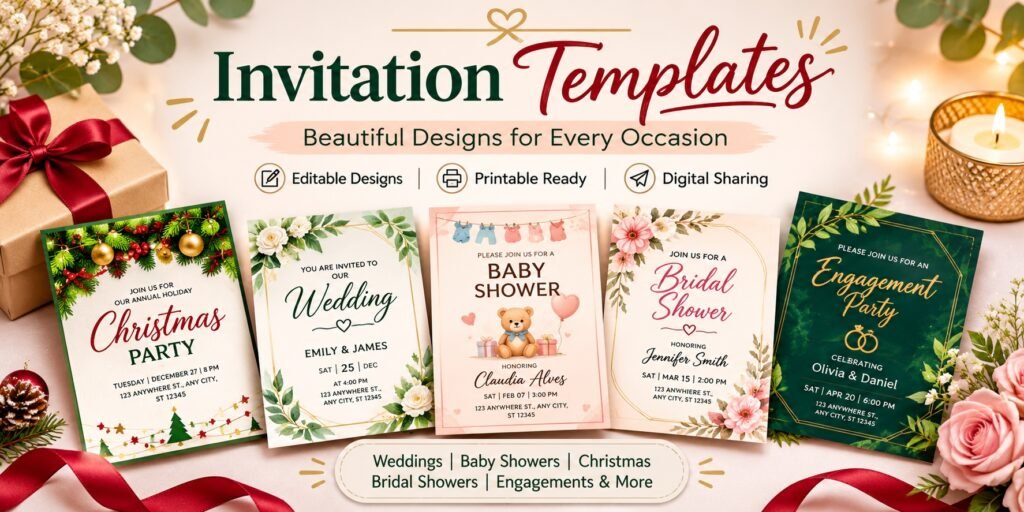
Whether you’re organizing a wedding, baby shower, Christmas party, or engagement celebration, a ready-made invitation can help you bring your ideas to life while keeping every important detail organized.
In this guide, you’ll discover different invitation styles, practical design tips, customization advice, and ideas for choosing invitations that feel right for your event.
What Are Invitation Templates?
Invitation templates are pre-designed layouts that you can personalize with your event information, such as names, dates, locations, and RSVP details.
Instead of designing an invitation from scratch, you begin with a layout that already includes typography, decorative elements, colors, and space for your message.
Depending on the product, templates may be editable online, downloadable for printing, or suitable for digital sharing.
For example, you could choose a floral invitation for a garden wedding, a playful design for a baby shower, or an elegant holiday-themed invitation for a Christmas dinner.
The main advantage is flexibility: you can focus on planning your celebration while using a prepared design as your starting point.
Why Choose Editable Invitation Templates?
Creating a custom-looking invitation doesn’t always require professional design experience.
Editable invitation templates can simplify the process in several ways.
1. Save time on design
You don’t need to decide where every heading, illustration, or text box should go. Much of the visual layout is already prepared.
2. Create a consistent theme
Invitations can introduce the colors and overall mood of your celebration, helping guests understand what to expect.
3. Add personal details
Depending on the editing options, you may be able to customize wording, fonts, colors, and photographs to make the design feel more personal.
4. Choose how to share
Some templates offer formats suitable for digital sharing, printing, or both.
5. Make updates more conveniently
An editable design can be helpful when you need to correct a spelling mistake, update the RSVP information, or adjust the wording before sending it.
The key is to check the product details before purchasing, since editing features vary between templates.
Popular Invitation Templates for Different Occasions
Every celebration has its own personality. Choosing a design that reflects the event helps create the right first impression.
Here are some popular invitation styles worth exploring.
1. Wedding Invitation Templates: Elegant and Personal
Wedding invitations often become treasured reminders of a couple’s special day.
Popular styles include romantic florals, modern minimalist layouts, watercolor illustrations, and botanical greenery.
A garden wedding, for example, may suit delicate wildflower details, while a formal evening ceremony might call for classic typography and understated colors.
CreatorStudio99’s collection includes designs such as Editable Floral Wedding Invitations, Customized Wildflower Wedding Invitations, and Green Floral Wedding Invitation Templates.
When selecting a wedding invitation, consider how the design complements your venue, color palette, and overall celebration.
Also, make sure ceremony details are easy to read.
2. Baby Shower Invitation Templates: Celebrate New Beginnings
A baby shower is a joyful occasion, and the invitation should reflect that warmth.
Soft pastel colors, cute illustrations, botanical themes, and playful lettering are common choices.
However, you don’t need to follow a traditional pink-or-blue theme.
Neutral colors, simple typography, and modern designs can work beautifully for any baby shower.
CreatorStudio99 offers products such as Editable Baby Shower Invitations, Baby Shower Invitation Template, and Christmas Baby Shower Invitations.
A warm wording example could be:
“A little bundle of joy is on the way! Join us for a wonderful afternoon celebrating the parents-to-be.”
Don’t forget to include the RSVP deadline, venue details, and registry information if appropriate.
3. Christmas and Holiday Invitation Templates: Share Festive Cheer
Christmas is all about bringing people together, whether it’s a cozy family dinner, office celebration, or festive gathering with friends.
Holiday invitation templates can feature traditional red and green colors, snowy illustrations, elegant gold accents, or cheerful Christmas decorations.
Choose a design that matches the atmosphere of your event.
A funny sweater party deserves something playful, while an elegant Christmas dinner may suit a more refined design.
For seasonal inspiration, explore CreatorStudio99’s Christmas Party Invitations collection.
A simple invitation message might read:
“The season of joy is here! Join us for an evening of festive food, laughter, and wonderful company.”
4. Bridal Shower and Bachelorette Invitation Templates
Bridal showers and bachelorette celebrations are wonderful opportunities to create something unique.
Bohemian florals, modern typography, bright fiesta colors, and playful party graphics can all work, depending on your theme.
For instance, a relaxed bridal brunch may suit a soft floral design, while a colorful celebration might benefit from bold illustrations.
CreatorStudio99 lists Boho Bridal Shower Invitations, Boho Chic Bridal Shower Invitations, and Customizable Bachelorette Party Invitations Templates.
Choose a design that communicates the tone of the party and makes guests excited to participate.
5. Engagement Invitation Templates: Celebrate Your Next Chapter
An engagement celebration marks the beginning of a new journey.
Invitations for these events often use elegant layouts, romantic wording, and personalized details.
For couples who prefer a simple aesthetic, a minimalist engagement invitation can create a polished impression without excessive decoration.
CreatorStudio99’s Engagement Invitation Card is one example of an editable design for announcing a special occasion.
Consider adding a meaningful message, such as:
“Two hearts, one beautiful journey. Join us as we celebrate our engagement with the people we love.”
6. Valentine’s Day Invitation Templates
Valentine’s Day celebrations can include romantic dinners, friendship gatherings, classroom parties, and family activities.
Depending on the event, you might choose heart illustrations, cheerful colors, sweet messages, or a more elegant design.
For a children’s classroom party, playful graphics often work well. For an intimate dinner, a minimal invitation with warm wording may be a better fit.
Remember that a greeting card and a party invitation serve different purposes. Choose a design with room for event details when you’re inviting guests to a celebration.
Digital vs. Printable Invitation Templates: Which Is Better?
Both formats have their advantages, and the best choice depends on your event.
| Digital invitations | Printable invitations |
| Can be shared through email or messaging apps | Can be mailed or handed to guests |
| Convenient for quick invitations | Suitable for formal celebrations |
| Do not require paper or postage | Offer a physical keepsake |
| Useful when guests live far apart | Allow different paper and finishing choices |
For example, a casual family gathering might only need a digital invitation, while a wedding may benefit from printed stationery.
Before purchasing, check whether the template supports your preferred sharing method and whether its download files are suitable for printing.
How to Choose the Perfect Invitation Template
The best invitation isn’t necessarily the most decorative one. It’s the design that matches your celebration and communicates clearly.
Match the Design to Your Event
Start by considering whether your celebration is formal, casual, traditional, or playful.
An elegant floral invitation might look beautiful, but it may not be the best choice for a funny holiday sweater party.
Prioritize Readability
Your guests should immediately notice the event name, date, time, and location.
Choose readable fonts, clear spacing, and sufficient contrast between the text and background.
Check Personalization Options
Before choosing an editable invitation template, review what can actually be changed.
Some products allow text editing, while others offer additional options such as adjusting fonts, changing colors, or adding pictures.
Consider Your Budget and Timeline
Digital products may help reduce printing and postage costs if you plan to share invitations electronically.
However, always consider any software requirements, printing expenses, and preparation time.
Think About Your Guests
If your guests are comfortable receiving invitations by email or text, digital sharing may be convenient.
If you’re inviting relatives who prefer traditional stationery, printed invitations may be more suitable.
How to Personalize Invitation Templates in 5 Simple Steps
Once you’ve selected your favorite design, you can begin making it your own.
Step 1: Add the Essential Event Details
Include the host’s name, event title, date, time, venue, and complete address.
Add an RSVP deadline and contact method so guests know how to respond.
For themed celebrations, mention dress codes, gift exchanges, or special activities.
Step 2: Write a Personal Invitation Message
Keep your wording appropriate for the event.
Formal celebrations may need a traditional tone, while family gatherings can feel more casual and friendly.
A short, thoughtful message often makes a stronger impression than a lengthy paragraph.
Step 3: Customize the Design
If the template allows it, adjust colors, fonts, or images to reflect your celebration.
Avoid using too many decorative elements, which can make the invitation difficult to read.
Step 4: Review Before Sharing
Double-check every name, date, and address.
Preview your invitation on a phone if you’re sending it digitally.
For printing, confirm the size, resolution, and any bleed requirements with your printer.
Step 5: Download and Send
Save the finished invitation in an appropriate format.
For digital sharing, use a clear, readable image or document. For printing, follow the supplier’s recommended file settings.
Send your invitations early enough that guests can make arrangements.
When Should You Send Invitations?
The ideal timing depends on the event.
For casual birthday parties, family gatherings, and smaller celebrations, two to four weeks in advance is often a useful starting point.
For bridal showers, baby showers, and larger holiday parties, you may prefer four to six weeks, especially when guests have busy schedules.
Weddings and destination events generally require considerably more planning time. Save-the-dates may be appropriate when travel arrangements are involved.
These aren’t fixed rules. The goal is to give your guests enough notice to attend comfortably.
Common Invitation Mistakes to Avoid
Before you finalize your design, watch out for these common problems:
- Missing information: Always include the correct date, time, location, and RSVP details.
- Too many fonts: Use a consistent typography style for a cleaner appearance.
- Poor contrast: Make sure the wording remains readable against the background.
- Overcrowded designs: Give important details enough space.
- Incorrect file formats: Check whether the finished invitation works for digital sharing or printing.
- Last-minute sending: Allow enough notice, particularly during busy holiday seasons.
Taking a few minutes to review these details can make your invitation more useful and professional.
Find Invitation Templates at CreatorStudio99
You don’t have to begin every celebration with a blank design.
CreatorStudio99 offers themed invitation products for weddings, engagements, baby showers, Christmas parties, bridal showers, bachelorette gatherings, and other special occasions.
Whether you prefer floral stationery, festive holiday graphics, or modern minimalist layouts, you can compare designs that suit your event.
Browse the Invitation Templates collection at CreatorStudio99 to explore available styles.
Before purchasing, review each listing’s preview images, editing instructions, included files, and sharing options.
The right template should make preparing your invitation feel simpler, while still allowing your celebration’s personality to shine through.
Final Thoughts
The best celebrations begin by making people feel welcome, and a thoughtful invitation helps create that feeling before guests arrive.
Whether you’re planning a wedding, family gathering, baby shower, or holiday party, Invitation Templates offer a convenient way to combine personal style with practical event information.
Focus on a design that reflects your celebration, customize it with meaningful details, and make sure every guest has the information they need.
Because a beautiful invitation doesn’t just announce an event. It gives people a reason to look forward to being there.
Frequently Asked Questions About Invitation Templates
What are the best invitation templates for parties?
The best invitation templates match the event’s theme, provide space for essential details, and are easy for guests to read. Choose based on the occasion, customization options, and how you plan to share the invitation.
Can I edit invitation templates without design experience?
Many editable invitation templates are designed for people without advanced design skills. However, the process depends on the editing platform and features included with the specific product.
Are digital invitation templates printable?
Some digital templates can also be printed, but not all files are suitable for high-quality printing. Check the product’s dimensions, resolution, and available formats.
What size should an invitation be?
A 5-by-7-inch card is a common choice for printed invitations in the United States, although other sizes are available. Always choose dimensions that match your design and printing requirements.
How do I make an invitation look professional?
Use a consistent color palette, readable fonts, balanced spacing, and a clear visual hierarchy. Make the event details easy to find and proofread everything before sharing.
Where can I find invitation templates for different occasions?
You can browse dedicated template collections such as CreatorStudio99’s themed invitation category, which features designs for weddings, baby showers, Christmas celebrations, engagements, and other events.