Building a website or sales funnel from scratch can take hours, or even days, when you have to plan the layout, design every section, create forms, write copy, connect calendars, and make sure everything works properly on mobile.
GoHighLevel templates provide a much faster starting point.
Instead of beginning with a blank page, businesses, freelancers, and marketing agencies can use pre-built templates for websites, funnels, landing pages, forms, emails, and other marketing assets and customize them for their own brand.
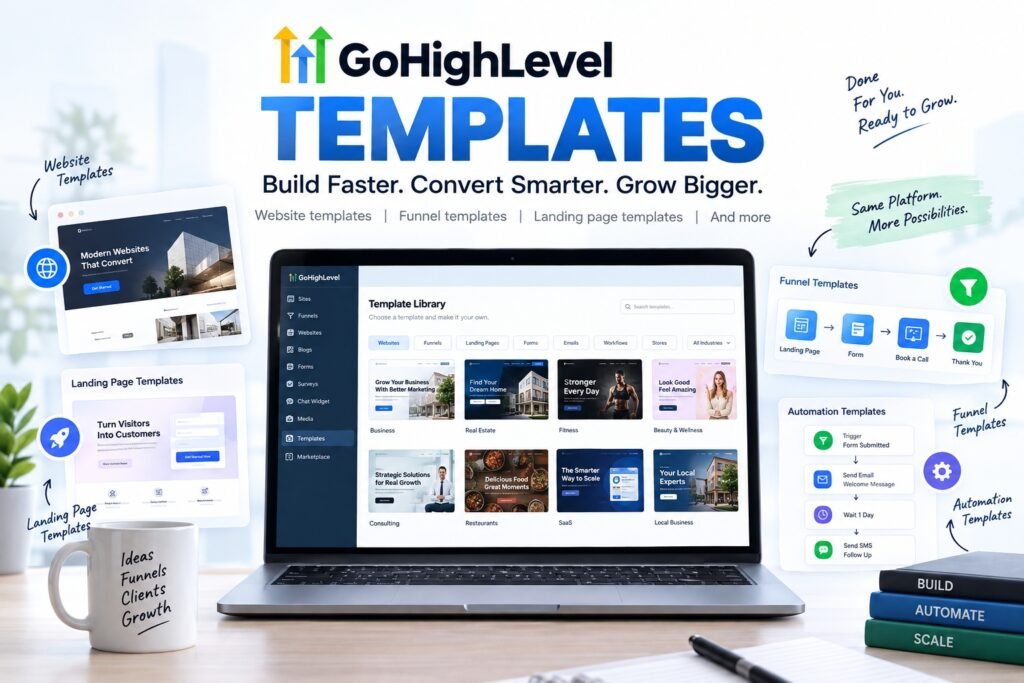
HighLevel’s current Template Library includes templates across multiple categories and industries, allowing users to start with an existing structure rather than creating every element manually.
But simply choosing a good-looking template isn’t enough.
The right template should fit your business goal, your audience, your conversion strategy, and the way your GoHighLevel account is structured.
In this guide, we’ll explain what GoHighLevel templates are, the different types available, how to choose the right one, how to customize it, and what to look for before publishing.
Table of Contents
What Are GoHighLevel Templates?
GoHighLevel templates are pre-designed layouts or marketing assets that can be imported or selected inside HighLevel and customized for a particular business.
Instead of designing an entire website, funnel, form, or email from zero, you begin with an existing structure and replace elements such as:
- Text
- Images
- Colors
- Fonts
- Logos
- Calls to action
- Forms
- Calendars
- Products
- Contact information
HighLevel’s official Template Library currently includes categories such as websites, funnels, workflows, emails, forms, and stores.
For websites specifically, HighLevel’s current library contains hundreds of designs across industries including business and consulting, automotive, beauty and fashion, creative services, financial services, software, and others.
The biggest advantage is simple: a template gives you a starting framework.
You still need to customize that framework to fit your business.
Types of GoHighLevel Templates
The term “GoHighLevel template” can describe several different types of assets.
1. GoHighLevel Website Templates
Website templates are designed for businesses that need a multi-page online presence.
They can include pages such as:
- Homepage
- About
- Services
- Contact
- Booking
- Pricing
- Blog
- FAQ
- Testimonials
These templates are useful for local businesses, agencies, consultants, coaches, service providers, and other companies that want their website connected directly to the HighLevel ecosystem.
GoHighLevel Website Templates
One of the most popular uses for GoHighLevel templates is website creation.
HighLevel allows users to create traditional websites inside its Sites platform instead of relying on a separate website builder.
According to HighLevel, websites are intended for broader multi-page use cases, while funnels generally guide visitors through a more direct sequence designed around a particular action.
A good GoHighLevel website template should give you more than attractive visuals.
Look for sections that support actual business goals, such as:
- Clear hero section
- Strong value proposition
- Service sections
- Social proof
- Testimonials
- Lead-capture forms
- Appointment booking
- FAQs
- Multiple calls to action
- Contact information
For example, a dentist may need service pages, appointment booking, reviews, insurance information, and contact sections.
A marketing agency may need service pages, case studies, lead generation forms, testimonials, and consultation booking.
Using the same generic website layout for both wouldn’t necessarily produce the best result.
The structure needs to match the business.
GoHighLevel Funnel Templates
Funnels serve a different purpose.
Instead of giving visitors many navigation choices, a funnel usually guides them toward a specific conversion action.
That might be:
- Booking an appointment
- Requesting a quote
- Registering for a webinar
- Downloading a lead magnet
- Purchasing a product
- Scheduling a consultation
- Submitting an application
HighLevel currently lets users create a funnel from scratch, use AI-assisted creation, or begin with a pre-designed template.
A typical funnel may look like:
Landing Page → Form → Booking Page → Thank You Page
Or:
Sales Page → Checkout → Upsell → Confirmation
This makes GoHighLevel funnel templates especially useful when the objective is lead generation rather than general website browsing.
What should you check in a funnel template?
Before choosing one, look at:
- Headline placement
- CTA visibility
- Form length
- Mobile layout
- Social proof
- Offer explanation
- Page speed
- Distractions
- Number of funnel steps
- Booking or checkout flow
A beautiful funnel that makes the user work too hard to convert isn’t necessarily a good funnel.
GoHighLevel Landing Page Templates
Landing pages are usually designed around one campaign and one primary action.
For example:
Google Ad → Landing Page → Lead Form
or:
Instagram Ad → Landing Page → Appointment Calendar
A strong GoHighLevel landing page template should keep attention focused.
Rather than adding excessive menus, animations, links, and unrelated sections, the page should clearly explain:
- What you’re offering
- Who it’s for
- Why it matters
- Why the visitor should trust you
- What they should do next
Some useful landing-page sections include:
- Benefit-focused headline
- Supporting subheadline
- Hero visual
- Key benefits
- Testimonials
- Trust signals
- Offer details
- FAQ
- Lead form
- Clear CTA
Templates vs GoHighLevel Snapshots
This is one area that often creates confusion.
A template and a snapshot aren’t necessarily the same thing.
A template may provide a website, funnel, form, or other individual marketing asset.
A HighLevel Snapshot can contain a much broader collection of account configurations.
According to HighLevel, snapshots can include assets such as:
- Funnels
- Websites
- Workflows
- Email templates
- SMS templates
- Calendars
- Forms
- Surveys
- Products
- Offers
- AI Studio projects
This makes snapshots particularly useful for agencies.
Imagine an agency specializing in dentists.
Instead of rebuilding the same infrastructure every time it signs a new client, it could prepare a reusable setup containing a website, booking calendar, forms, lead workflows, email campaigns, SMS follow-ups and other assets.
That system can then become the starting point for additional clients.
How to Choose the Right GoHighLevel Template
There are plenty of GoHighLevel templates available, but selecting one based purely on visual appearance is usually a mistake.
Consider these factors first.
1. Start With Your Goal
Ask what the page actually needs to accomplish.
Do you want visitors to:
- Call your business?
- Submit a form?
- Schedule an appointment?
- Purchase something?
- Request a quote?
- Download something?
- Join a webinar?
Your conversion goal should influence the template you choose.
2. Match the Template to Your Industry
An industry-specific template can reduce the amount of customization required.
A template designed for a law firm will probably have a different structure from one designed for:
- Real estate
- Fitness
- SaaS
- Dental clinics
- Marketing agencies
- Restaurants
- Coaches
- Contractors
You don’t necessarily need an exact industry match, but the underlying structure should make sense for your service.
3. Review the Mobile Version
Never evaluate a template only from its desktop preview.
Check:
- Button sizes
- Text readability
- Image cropping
- Spacing
- Form usability
- Navigation
- Section length
HighLevel says newer templates are responsive, while some older ones may require additional mobile adjustments.
That makes manual mobile review important before publishing.
4. Check the CTA Structure
Visitors shouldn’t have to search for the next step.
Your main CTA might be:
Book a Free Consultation
Get a Quote
Schedule an Appointment
Start Your Free Trial
Download the Guide
Whatever it is, it should appear naturally throughout the page.
5. Look Beyond Design
It’s easy to become distracted by animations and elaborate design effects.
But ask more practical questions:
Does the template communicate the offer clearly?
Can visitors understand the business within a few seconds?
Is important information easy to find?
Are there unnecessary sections?
Can users quickly reach the conversion point?
Function comes before decoration.
How to Customize a GoHighLevel Template
Using a template doesn’t mean your website should look like everyone else’s.
Customization is where the template becomes your own.
Step 1: Replace the Branding
Update:
- Logo
- Brand colors
- Typography
- Icons
- Photography
- Background elements
Keep these elements consistent across the entire website or funnel.
Step 2: Rewrite the Copy
Don’t simply replace the company name while leaving generic template text everywhere else.
Rewrite the content around your real audience.
Your headline should clearly answer:
What do you do, who is it for, and why should someone care?
Step 3: Update the Calls to Action
Decide on your primary conversion action.
Avoid having five competing CTAs throughout one page unless there is a clear reason.
Step 4: Configure Forms
Check exactly what information you need.
If you’re offering a simple consultation, asking visitors to complete 15 fields may create unnecessary friction.
Step 5: Connect Your Calendar
For appointment-based businesses, connect the correct HighLevel calendar and verify:
- Availability
- Time zone
- Appointment duration
- Confirmation
- Reminders
Step 6: Connect Workflows
This is where GoHighLevel becomes more than a page builder.
Once a lead completes a form, you can build workflows around actions such as:
Form submission → CRM contact created → confirmation email → SMS follow-up → appointment reminder
The exact workflow depends on your business.
Step 7: Review SEO Elements
For website pages, check:
- Page title
- Meta description
- URL
- Heading hierarchy
- Image alt text
- Internal links
- Page copy
- Mobile usability
Don’t assume that importing a template means the page is automatically optimized for search.
Step 8: Test Everything
Before publishing, test the website like a potential customer.
Submit the form.
Click the buttons.
Book an appointment.
Open the page on your phone.
Check confirmation messages.
Review emails.
Check links.
A visually finished template isn’t necessarily a technically finished website.
GoHighLevel Templates vs Building From Scratch
Should you use a template or create a completely custom design?
It depends.
Choose a template when:
- You need to launch quickly
- Your business has a relatively standard structure
- You don’t want to design every section manually
- You have a smaller budget
- You already know what layout you need
- You’re building similar sites repeatedly
Consider a custom design when:
- Your brand needs a very distinctive identity
- You have unusual functionality requirements
- Your customer journey is complex
- Existing templates require extensive modification
- You have detailed UX requirements
- Your website is a major part of your competitive positioning
There’s also a middle ground:
Start with a high-quality template and customize it heavily.
For many small businesses and agencies, this provides a practical balance between speed and originality.
Common GoHighLevel Template Mistakes
Templates can save time, but they also make certain mistakes surprisingly easy.
Keeping Placeholder Copy
Generic copy makes the website feel generic.
Every major section should reflect the actual business.
Using Too Many Sections
More sections don’t automatically create a better landing page.
Remove anything that doesn’t help the visitor understand the offer or take the desired action.
Ignoring Mobile Design
A desktop page can look excellent while the mobile version has awkward spacing, oversized headlines or badly cropped images.
Always review both.
Forgetting Forms and Workflows
A page isn’t finished simply because it looks right.
Make sure the forms, calendars, automations and follow-ups actually work.
Using Too Many Calls to Action
Multiple competing goals can make the page confusing.
For a campaign landing page in particular, keep the primary conversion objective obvious.
Forgetting SEO
If you’re building a website intended to receive organic traffic, customize the SEO rather than retaining generic template metadata.
Choosing Design Over Conversion
A visually impressive website can still perform poorly.
Design should support the customer’s journey rather than compete with it.
What Makes a Good Conversion?
Before selecting a template, use this checklist:
- Clear headline
- Strong value proposition
- Logical page structure
- Visible CTA
- Mobile-friendly layout
- Easy-to-use forms
- Trust signals
- Testimonials or reviews
- Service/offer explanation
- Consistent branding
- Fast, uncluttered design
- Relevant imagery
- FAQ section where appropriate
- Proper contact information
- Clear next step
Think of a template as the foundation.
Its real performance will depend on what you build on top of it.
How Agencies Can Use GoHighLevel Templates
Templates become especially useful when you’re managing multiple clients.
An agency that works with similar businesses repeatedly doesn’t necessarily need to recreate every asset from scratch.
For example, an agency serving home-service companies might develop a reusable structure containing:
Homepage → Services → Service Area → Reviews → Booking → Contact
Then customize the:
- Logo
- Brand colors
- Services
- Copy
- Images
- Contact details
- Reviews
- Forms
- Calendars
For more advanced reuse, agencies can use HighLevel Snapshots to replicate a broader account setup.
HighLevel describes snapshots as reusable configurations that can help agencies launch new clients faster and standardize repeatable setups across accounts.
In July 2026, HighLevel also integrated its Template Library more closely with its Marketplace, enabling agencies to browse, preview, install, purchase and even sell supported templates from within the ecosystem.
That makes templates increasingly relevant not just for building websites but also for creating reusable digital products and agency systems.
Find the Right GoHighLevel Template for Your Business
The best GoHighLevel template isn’t necessarily the one with the most animations or the most elaborate design.
It’s the one that provides the right foundation for your customer journey.
Start by identifying your goal. Then look for a template with the appropriate structure, customize it around your brand, connect your forms and automations, optimize it for mobile, and test the entire experience before launch.
If you don’t want to build everything from scratch, professionally designed GoHighLevel templates can give you a faster starting point while still allowing you to customize the final website or funnel around your business.
Final Thoughts
GoHighLevel templates can significantly reduce the amount of repetitive design work involved in launching websites, landing pages and funnels.
But a template should be treated as a starting point, not a finished marketing strategy.
The strongest results come from combining a solid template with clear messaging, thoughtful branding, simple navigation, effective calls to action, functional forms, CRM integrations and properly configured automation.
Whether you’re building your own business website or creating systems for multiple clients, choosing the right template can help you spend less time rebuilding basic structures and more time refining the parts that actually matter to your customers.
Frequently Asked Questions
Does GoHighLevel have templates?
Yes. HighLevel has a Template Library containing pre-built assets for websites, funnels and multiple other marketing use cases. Users can select a template and customize it for their brand and campaign.
Are GoHighLevel templates customizable?
Yes. HighLevel templates can be customized by changing elements such as colors, fonts, text, images and layouts. Custom code can also be added where needed.
Does GoHighLevel have website templates?
Yes. HighLevel has a dedicated website template library covering numerous industries and page types.
Does GoHighLevel have funnel templates?
Yes. When creating a funnel, users can start from a blank funnel, use AI-assisted creation or select a pre-built template from the Template Library.
What is the difference between a GoHighLevel template and a snapshot?
A template normally represents an individual reusable asset such as a website, funnel, form or email. A snapshot can package a broader collection of account configurations and assets so they can be reused across HighLevel sub-accounts.
Can I use GoHighLevel templates for clients?
Yes. Templates can help agencies build client websites and marketing assets more efficiently. Snapshots can provide an even broader reusable setup when multiple account assets need to be duplicated.
Are GoHighLevel templates good for SEO?
A template can provide the website structure, but SEO still depends on how the site is customized. Page titles, content, URLs, internal links, headings, images, site structure and other elements should be optimized specifically for the business.
Can I customize a GoHighLevel template without coding?
Many normal design changes can be made using HighLevel’s visual builder without writing code. HighLevel also supports custom code when more advanced customization is necessary.