
If your Meta Ads reports don’t match your actual sales, this guide will help you understand why, and how to fix it.
Imagine This…
You’ve been running Meta Ads for the past month.
Your Shopify store reports 156 purchases, but when you open Meta Ads Manager, it only shows 117 conversions.
Immediately, questions start racing through your mind.
- Is my Facebook Pixel broken?
- Did Meta fail to track some purchases?
- Am I making advertising decisions using incorrect data?
- Should I install the Conversion API?
- Or does Conversion API replace Facebook Pixel altogether?
If you’ve ever experienced this situation, you’re not alone.
Thousands of advertisers face the same problem every day, not because their campaigns aren’t working, but because the way Meta tracks customer activity has changed dramatically over the last few years.
Privacy updates, browser restrictions, cookie limitations, and ad blockers have made it increasingly difficult for traditional browser-based tracking to capture every customer interaction accurately.
To overcome these challenges, Meta introduced the Conversion API (CAPI), a server-side tracking solution designed to work alongside the Facebook Pixel.
The problem is that many businesses misunderstand how these two technologies work.
Some believe Facebook Pixel is outdated.
Others think Conversion API completely replaces it.
The reality is much simpler, and once you understand it, you’ll be able to build more reliable tracking, make smarter advertising decisions, and help Meta’s AI optimize your campaigns more effectively.
In this guide, you’ll learn the difference between Facebook Pixel and Conversion API, how they work together, and why using both is considered the best practice for Meta Ads in 2026.
Quick Takeaways
If you’re short on time, here’s what you need to know.
✔ Facebook Pixel tracks customer activity through the visitor’s browser.
✔ Conversion API sends important conversion events directly from your website’s server to Meta.
✔ These tools are not competitors; they’re designed to work together.
✔ Better tracking doesn’t just improve reporting. It provides Meta’s AI with more accurate data, helping it optimize campaigns and identify more potential customers.
Why Tracking Matters More Than Ever
A few years ago, tracking website visitors was relatively straightforward.
Someone clicked your Facebook ad, visited your website, and the Facebook Pixel recorded what happened next.
Today, things aren’t that simple.
Customers browse your website on multiple devices, switch between browsers, block cookies, install privacy-focused extensions, and expect greater control over their personal data.
At the same time, browsers like Safari and Firefox have introduced stricter privacy measures, while Apple’s App Tracking Transparency (ATT) framework has reduced the amount of browser data available to advertising platforms.
The result?
Your ads might be generating sales that Meta never records.
Imagine trying to solve a jigsaw puzzle with several pieces missing.
You can still recognize the overall picture, but you don’t have the complete story.
That’s exactly what incomplete tracking looks like.
And here’s why it matters.
Meta’s advertising algorithm learns from conversion events.
Every purchase…
Every lead…
Every checkout…
Every form submission…
…helps Meta understand what your ideal customer looks like.
If some of those events never reach Meta, its AI has less information to work with.
That means your campaigns may not optimize as effectively as they could.
💡 Marketing Insight
Many advertisers believe tracking exists only to measure campaign performance.
In reality, tracking is also how Meta’s AI learns.
Better tracking doesn’t automatically improve your Return on Ad Spend (ROAS), but it provides Meta with more complete data to optimize toward the people most likely to convert.
Chapter 1: What Is Facebook Pixel?
Before comparing Facebook Pixel and Conversion API, let’s understand what the Pixel actually does.
The Facebook Pixel is a small piece of code installed on your website that tracks how visitors interact with your pages after clicking a Meta advertisement.
Think of it as your website’s digital observer.
Whenever someone performs an important action, the Pixel can record events such as:
- Viewing a product
- Adding an item to the cart
- Starting the checkout process
- Completing a purchase
- Submitting a lead form
- Booking an appointment
- Registering for an event
This information is then sent back to Meta, allowing you to measure campaign performance and helping the platform optimize future ad delivery.
Without the Pixel, Meta would know that someone clicked your advertisement, but it wouldn’t know whether that click actually generated a valuable business outcome.
A Simple Analogy Anyone Can Understand
Imagine you own a retail clothing store.
At the entrance stands a security guard.
Every customer who walks through the front door is counted.
The guard notes when customers enter the store and estimates how busy the shop is throughout the day.
That’s essentially how the Facebook Pixel works.
It records customer activity through the “front entrance”, their web browser.
But here’s the challenge.
Sometimes customers don’t enter through the main entrance.
Maybe they’re using another authorized entrance.
Maybe the security guard is temporarily distracted.
Or perhaps visibility is limited.
As a result, not every visitor gets counted.
The same thing happens online.
Modern browsers, privacy settings, cookie restrictions, and ad blockers can prevent the Pixel from recording every customer interaction.
This doesn’t mean the Pixel is broken.
It simply means browser-based tracking has limitations in today’s privacy-first digital landscape.
Why Facebook Pixel Alone Isn’t Always Enough
Let’s look at a real-world example.
Imagine Sarah sees your Instagram ad for a pair of running shoes.
She clicks the ad on her phone, browses your website, and adds the shoes to her cart.
Later that evening, she remembers the product and visits your website directly from her laptop to complete the purchase.
From a business perspective, Meta helped generate that sale.
But depending on your tracking setup, Meta may only receive part of Sarah’s journey, or miss the final purchase event altogether.
This creates a gap between the sales your business actually generated and the conversions Meta can see.
And when Meta doesn’t receive complete conversion data, it has fewer signals to learn from when optimizing your future campaigns.
That brings us to the second half of the tracking equation: Conversion API.
Unlike Facebook Pixel, which relies on the customer’s browser, Conversion API takes a completely different approach, one designed to make tracking more reliable in a privacy-focused world.
Chapter 2: What Is Conversion API?
Now that you understand how the Facebook Pixel works, let’s look at the technology Meta introduced to overcome its limitations.
The Meta Conversion API (CAPI) is a server-side tracking solution that sends important customer events directly from your website’s server to Meta’s servers.
Unlike the Facebook Pixel, it doesn’t rely solely on the visitor’s browser to report what happened.
Instead, your website communicates directly with Meta whenever a meaningful action occurs, such as:
- A completed purchase
- A lead form submission
- A newsletter signup
- A subscription
- A booking or appointment
Because the data comes directly from your server, it’s less affected by browser privacy settings, ad blockers, or cookie restrictions.
Think of it as having a second, more reliable communication channel.
A Simple Analogy
Imagine you’re sending an important package.
Facebook Pixel
You send it through a local courier.
Usually, it arrives safely, but traffic jams, roadblocks, or bad weather can sometimes delay or even prevent delivery.
Conversion API
Now imagine sending the same package through a dedicated business logistics network that communicates directly with the destination.
The chances of successful delivery are much higher.
That’s exactly how Conversion API works.
It doesn’t replace the courier.
It provides another reliable route to ensure important information reaches Meta.
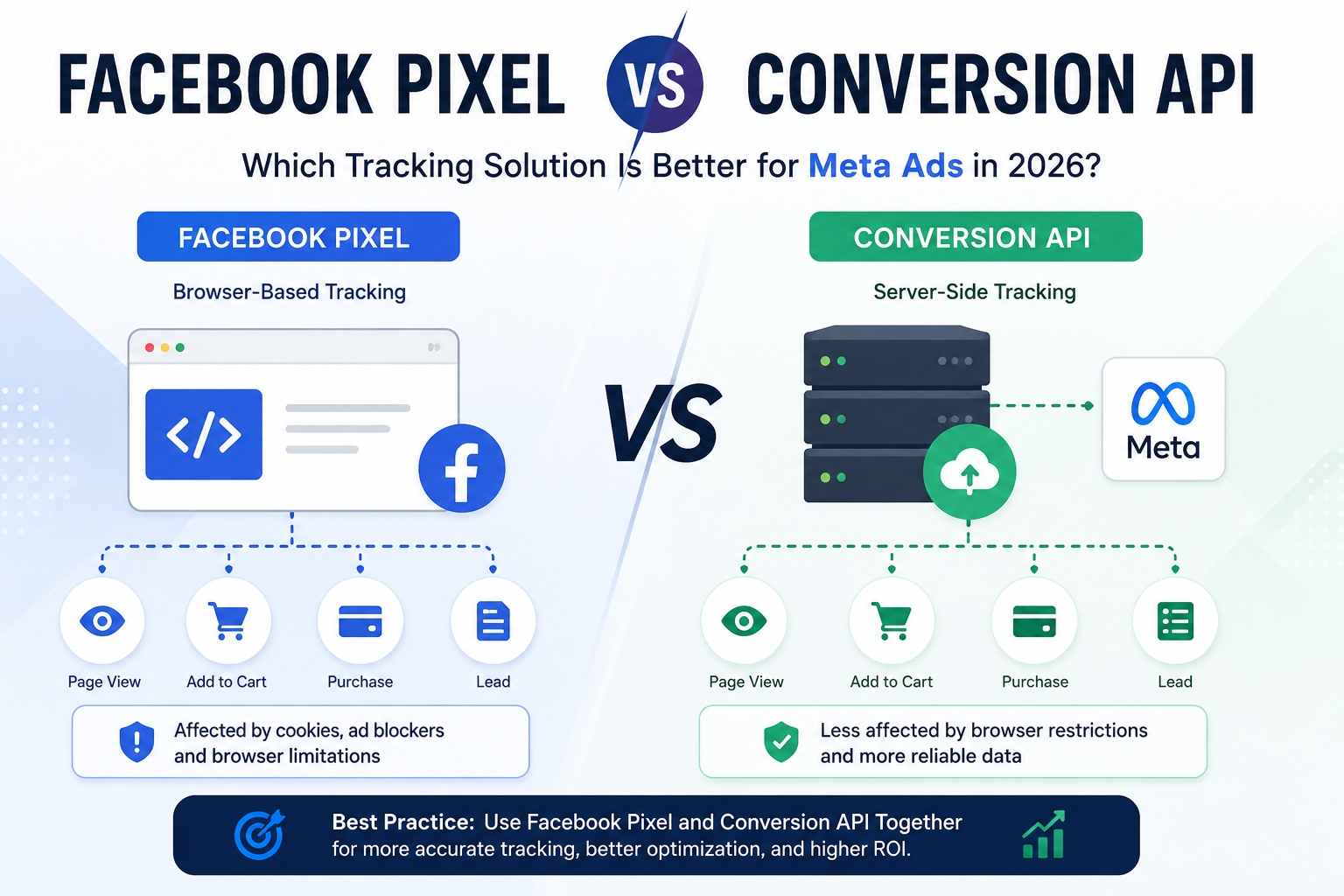
Facebook Pixel vs Conversion API
Although they’re often compared, Facebook Pixel and Conversion API aren’t competing technologies.
They solve different parts of the same problem.
| Feature | Facebook Pixel | Conversion API |
| Tracking Method | Browser-based | Server-side |
| Relies on Cookies | Yes | Minimal |
| Affected by Ad Blockers | More likely | Less likely |
| Browser Privacy Impact | Higher | Lower |
| Setup Difficulty | Easier | More Technical |
| Data Reliability | Good | More Consistent |
| Best Practice | Use with CAPI | Use with Pixel |
The biggest takeaway?
It’s not Facebook Pixel or Conversion API.
It’s Facebook Pixel and Conversion API.
Why Using Both Is Better (The Part Most Blogs Miss)
Many articles stop after explaining the differences.
But here’s what really matters.
Meta doesn’t simply use your tracking data for reporting.
It uses that data to train its advertising algorithm.
Every conversion tells Meta:
“Find more people like this customer.”
If Meta only receives 70 out of 100 actual purchases because some browser events were blocked, its AI is learning from incomplete information.
Now imagine Meta receives 95 out of those 100 purchases because you’ve implemented both Facebook Pixel and Conversion API.
The algorithm now has a much clearer understanding of who your ideal customers are.
Better data doesn’t magically improve your ads overnight, but it gives Meta’s machine learning a stronger foundation for optimization.
This is why tracking quality directly influences campaign performance over time.
📌 Marketing Insight
Many advertisers focus on improving ad creatives or increasing budgets before checking whether their tracking is accurate.
In reality, even the best creative can’t reach its full potential if Meta isn’t receiving reliable conversion data.
Think of tracking as the foundation of your Meta Ads strategy. Without a solid foundation, every optimization decision becomes less reliable.
Common Tracking Mistakes to Avoid
Even businesses using Facebook Pixel and Conversion API can make mistakes that reduce tracking accuracy.
Here are some of the most common ones:
❌ Installing Only the Pixel
Many businesses still rely solely on browser-based tracking, missing valuable server-side data.
❌ Duplicate Events
If Pixel and Conversion API aren’t configured correctly, Meta may receive the same conversion twice. Proper event deduplication prevents this.
❌ Tracking the Wrong Events
Recording every button click as a conversion creates noisy data that confuses the algorithm. Focus on meaningful events such as purchases, qualified leads, or completed bookings.
❌ Never Testing the Setup
After implementation, always verify your events using Meta’s Events Manager and the Test Events tool to ensure data is being received correctly.
💡 Expert Tip
Don’t judge your tracking setup solely by whether the numbers in Meta Ads perfectly match your Shopify store or Google Analytics.
Each platform measures conversions differently using different attribution models and reporting windows.
Instead of chasing identical numbers, focus on ensuring your tracking is consistent, reliable, and complete enough for Meta to optimize your campaigns effectively.
Frequently Asked Questions
Does Conversion API replace Facebook Pixel?
No. Meta recommends using both together because they complement each other and provide more complete tracking.
Is Facebook Pixel still important in 2026?
Absolutely. The Pixel remains an essential part of Meta’s tracking ecosystem. The Conversion API enhances it rather than replaces it.
Can Conversion API improve Meta Ads performance?
Indirectly, yes. More reliable conversion data helps Meta’s AI make better optimization decisions, which can improve campaign performance over time.
Is Conversion API difficult to set up?
It can be more technical than installing the Pixel, but platforms like Shopify, WooCommerce, and many website builders now offer easier integrations.
Which tracking solution should new advertisers use?
The current best practice is to implement both Facebook Pixel and Conversion API from the beginning whenever possible.
Key Takeaways
Before you launch your next Meta Ads campaign, remember these important points:
✅ Facebook Pixel tracks customer activity through the browser.
✅ Conversion API sends conversion data directly from your server.
✅ Neither tool replaces the other, they work best together.
✅ Better tracking provides Meta’s AI with more accurate data for optimization.
✅ Regularly test your tracking setup to ensure your campaigns are learning from complete conversion data.
Final Thoughts
As digital privacy continues to evolve, accurate tracking has become one of the most important foundations of successful Meta advertising.
While the Facebook Pixel remains a powerful tool for measuring on-site activity, relying on browser-based tracking alone is no longer enough for many businesses. By combining the Pixel with the Conversion API, you can create a more resilient tracking setup that gives Meta a clearer understanding of customer behavior.
The goal isn’t simply to collect more data, it’s to collect better data.
When Meta receives more complete conversion signals, it can make smarter optimization decisions, helping you improve campaign performance while making better use of your advertising budget.
If you’re unsure whether your tracking is configured correctly, a professional Meta Ads audit can identify missing events, implementation issues, and optimization opportunities before they impact your campaign performance.